Importing a real network
A shipped network is a snapshot. To work on the network as it is today, import it from a live source.
A *region* is held by a node and decides what it relays; a *scope* rides a packet and decides who relays it. The distinction runs through every step below, and the concepts page has the full table.
What can be imported#
| source | what it provides |
|---|---|
| CoreScope | nodes, positions, and the packet history regions are inferred from |
| Beacon | nodes and positions |
| a JSON export | a network somebody else built |
The order, which matters#
Each step depends on the one before it, and a skipped step produces a network that looks fine and behaves wrongly.
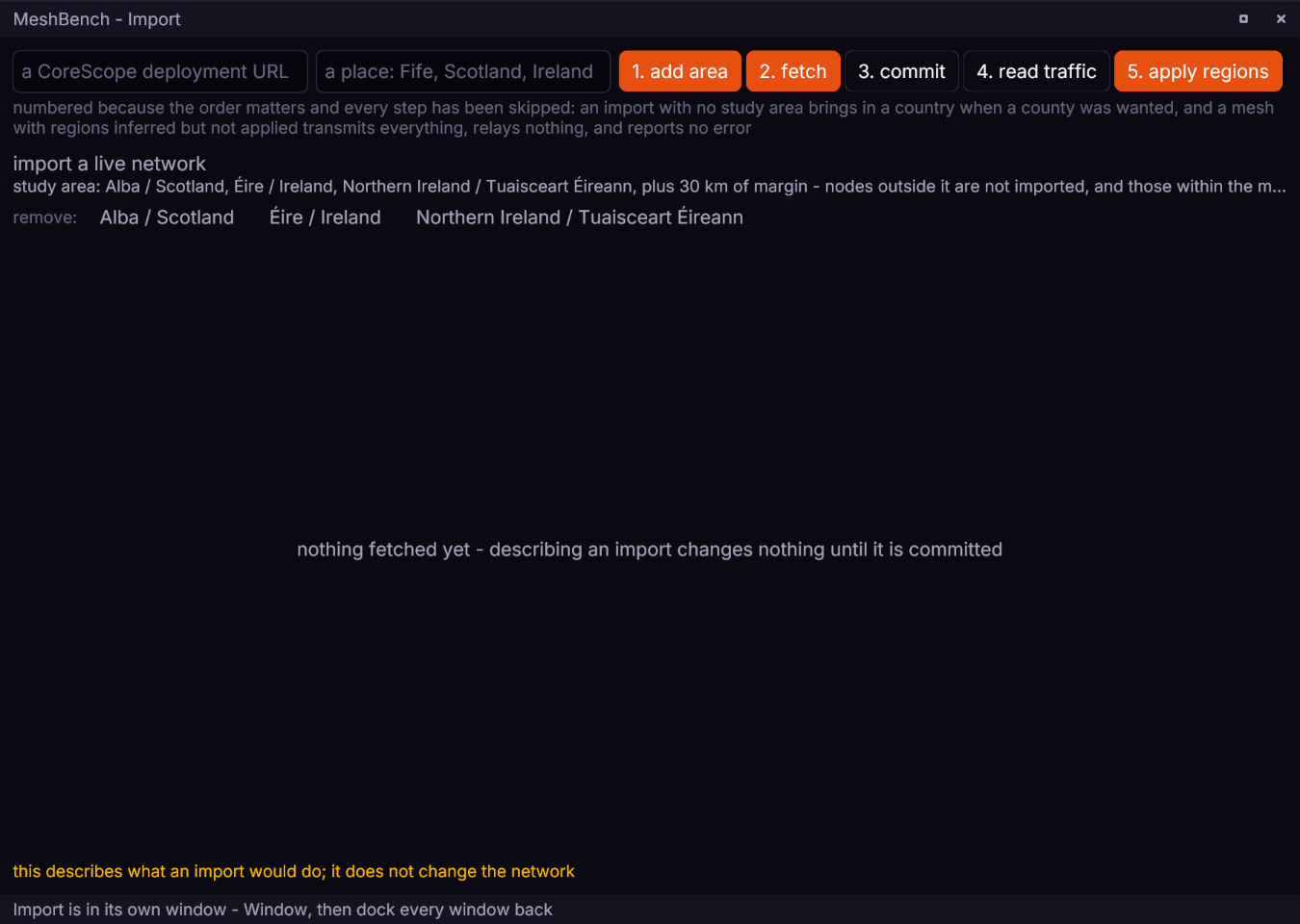
The whole chain is on the Import panel, whose buttons are numbered in this order - and from Python or Go it is one call, wb.live.pull(url) / wb.Live().Pull(ctx, url, 0, 0), which runs fetch, commit, inference and apply together. The steps below are for doing it a step at a time.

1. Choose the area first#
The import is filtered by the chosen boundary, so setting it first avoids fetching a continent to keep a county.
On the Import panel, type the place into *a place: Fife, Scotland, Ireland* and press 1. add area. Add each area the study needs - areas union, so Scotland plus Ireland is two presses.
{"id":1,"method":"boundary.set","params":{"query":"Fife"}}
{"id":2,"method":"boundary.accept"}print(wb.boundary.use("Fife")) # searches, accepts, and says what it chosestudying, err := wb.Boundary().Use(ctx, "Fife")Areas union, so Scotland plus Ireland is two accepts. Boundaries come from OpenStreetMap and are cached; a hand-drawn latitude and longitude box keeps null-island nodes and cuts coastline wrongly.
2. Fetch and commit#
Paste the deployment address into *a CoreScope deployment URL*, press 2. fetch, read the counts it reports, then press 3. commit. Nothing changes until the commit, and fetching only describes what an import would do. The workbench's commit replaces the current network (replace-all); keeping the current nodes alongside (add) is a socket or client choice.
{"id":3,"method":"import.set_source","params":{
   "source":"corescope","url":"https://your-corescope.example"}}
{"id":4,"method":"import.fetch"}
{"id":5,"method":"import.commit","params":{"strategy":"replace-all"}}The Python client shapes the whole chain rather than this single step: wb.live.pull(url) runs fetch, commit, inference and apply in one call. For just this step, send the socket verbs above with wb.call(verb, params).
The Go client shapes the whole chain rather than this single step:
found, err := wb.Live().Pull(ctx, url, 0, 0)For just this step, send the socket verbs above with wb.Call(ctx, verb, params).
There are two strategies. replace-all clears the current nodes and starts from the import; add keeps them and puts the imported nodes alongside. Anything else is refused with an error naming the two.
Nodes are filtered at ±1 km position uncertainty. A node whose position is a guess would answer a reach question with a guess. Some tens of nodes typically sit at latitude and longitude zero, and some have no position at all; both are dropped, and the counts are reported.
3. Prune#
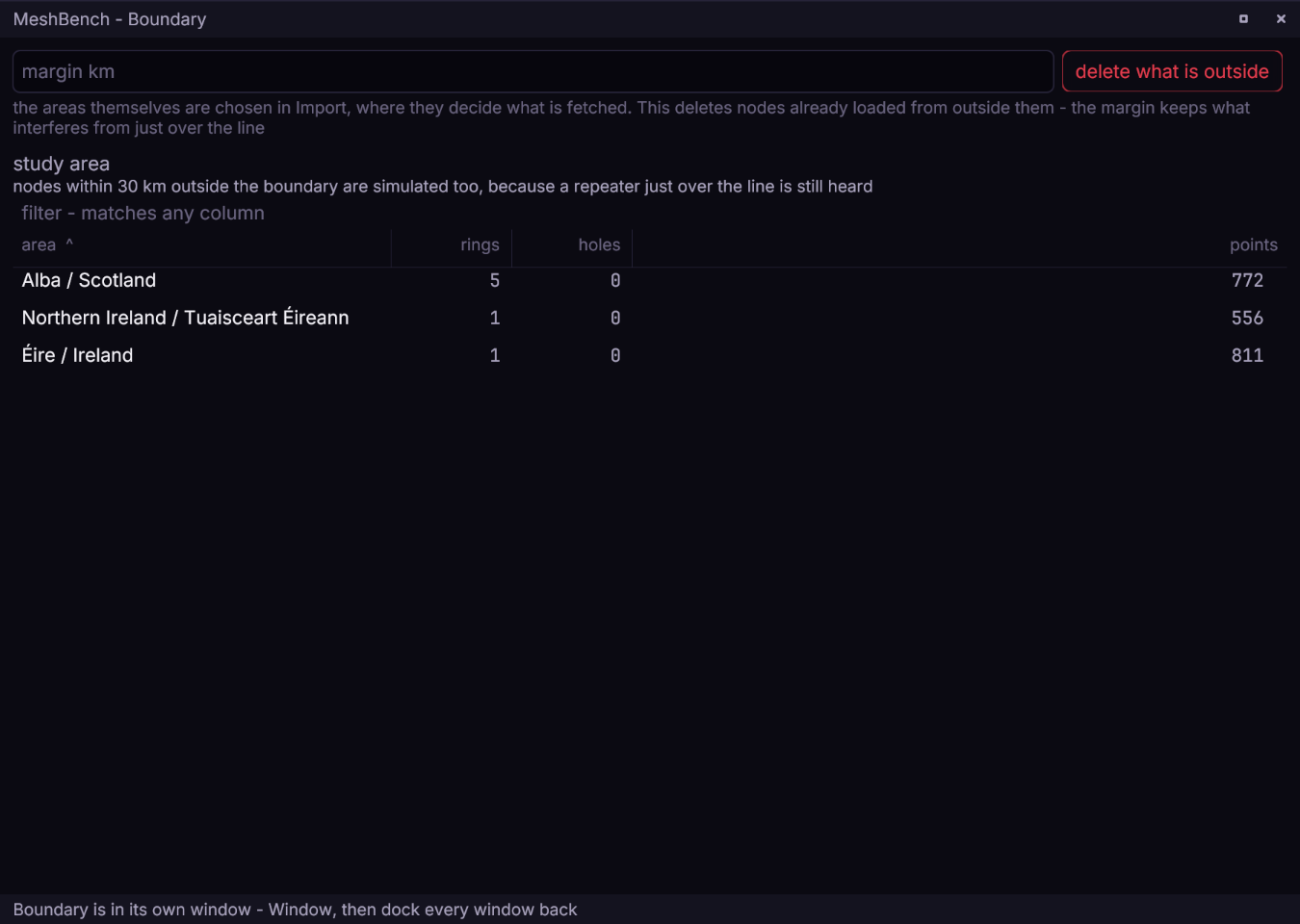
On the Boundary panel, press delete what is outside. The margin box beside it keeps what is just over the line - a repeater 20 km outside the boundary is still heard inside it.
{"id":6,"method":"boundary.prune"}wb.call("boundary.prune")raw, err := wb.Call(ctx, "boundary.prune", nil)Removes anything outside the chosen areas, and reports the before and after counts.
4. Give the nodes firmware#
Imported nodes carry no firmware reference, which resolves to MeshCore main, for which nothing is published. A run then fails with firmware on none of the nodes.
In the firmware library, press use for role on the build each role should run - it sets every node of that role at once.
{"id":7,"method":"firmware.set","params":{
"node":"Abernethy Repeater","role":"simple_repeater","version":"repeater-v1.17.0"}}wb.firmware.use_what_is_here() # newest on-disk build, per role_, err := wb.Firmware().UseWhatIsHere(ctx)Pass a node. firmware.set with a role and no node applies to every node that runs firmware *and sets its role*, so three calls in a row convert the whole network three times rather than pinning three roles.
5. Infer the regions, and apply them#
Transport regions are not in any node API. They are inferred from days of packet traffic, by matching each packet's transport code against candidate region keys.
On the Import panel, press 4. read traffic, wait for the result line, then press 5. apply regions. The panel reports how many nodes changed.
{"id":8,"method":"infer.run","params":{"hours":168}}
{"id":9,"method":"infer.result"}
{"id":10,"method":"infer.apply"}Already covered if the import came in through wb.live.pull(url), which ends with this step. On its own:
wb.call("infer.run", {"hours": 168})
wb.call("infer.apply")Already covered by wb.Live().Pull. On its own:
_, err := wb.Call(ctx, "infer.run", map[string]any{"hours": 168})
_, err = wb.Call(ctx, "infer.apply", nil)infer.apply is a separate call and returns how many nodes it changed. A result of zero means inference ran and nothing was written. A healthy total can still hide gaps: inference only reaches nodes seen in the traffic, so a quiet repeater can come through with no regions at all. The Nodes table's region column says which, and over the socket nodes.list carries regions per node; widen the hours window if the feed is thin.
**Without this step no *scoped* message relays. A scoped message is sent by its originator and dropped by every repeater, with no error anywhere. Adverts are unscoped and flood regardless, exactly as widely as with regions, so pressing advert** is not the test: send on the channel and watch whether anything but the sender hears it. And because this step also gives each node its default scope, a mesh without it originates nothing scoped at all.
The result lists how many nodes hold each region. Choosing a scope only a handful hold produces the same silence for the same reason.
6. Save it#
File, then Save this network (Ctrl+S).
{"id":11,"method":"project.save","params":{"name":"my-network"}}wb.project.save("my-network")name, err := wb.Project().Save(ctx, "my-network")A saved project holds the nodes, the boundary polygons, the seed, the traffic schedule and the assertions, so it opens later with no network access and no re-inference.
7. Write scopes with the hash#
A region is spelled two ways, and both are correct:
| where | form |
|---|---|
| a node's console | bare: region put sco |
| a scope on the wire | prefixed: #sco |
The key in a packet is a hash of the prefixed form. Sending on sco produces a key no repeater holds, and every one of them declines to forward without reporting anything.
If nothing relays#
The four silent failures above, in the order to check them:
- Regions inferred but never applied. Adverts flood, scoped messages vanish. Press 5. apply regions, and confirm the count.
- A quiet node with no regions. The total was healthy, one repeater was
not. The Nodes table's region column says which; over the socket,
nodes.listcarriesregionsper node. No console command reads them back:get repeatreports whether repeating is on, a different question, and answersonon a node with no regions at all. - No firmware version. Imported nodes resolve to an unpublished build until step 4 gives them one.
- A scope without its hash. Sending on
scokeys packets no repeater matches. Write#sco.
Debugging packet delivery picks up from here with the full cause-by-cause workflow.